Search This Blog

This is default featured slide 1 title

Go to Blogger edit html and find these sentences.Now replace these sentences with your own descriptions.

This is default featured slide 2 title

Go to Blogger edit html and find these sentences.Now replace these sentences with your own descriptions.

This is default featured slide 3 title

Go to Blogger edit html and find these sentences.Now replace these sentences with your own descriptions.

This is default featured slide 4 title

Go to Blogger edit html and find these sentences.Now replace these sentences with your own descriptions.

This is default featured slide 5 title

Go to Blogger edit html and find these sentences.Now replace these sentences with your own descriptions.

Showing posts with label Medical smartphones. Show all posts

Friday, September 30, 2011

A Few tips to save Money on Smartphone Plans as a Medical Student

If you're a medical student or a resident, you probably don't have the luxury of a really expensive smartphone plan. I remember those days when we were trying to save every penny because our finances were so tight. Of course, many people also have the luxury of student loans, so they may not be so budget-focused. For those looking for a few tips on ways to save money on smartphone plans, here are a few suggestions:
  1. Eliminate the data plan (if you have the option) and choose a very simple cell phone plan. Do you really need a data plan on your smartphone? Or, can you get by with Wi-Fi only?
  2. Leverage coupons and resellers. Buy a smartphone through a reseller that offers discounts and coupons. Do some searching online and look for savings.
  3. Share minutes on a family plan. We all have family. Are they willing to put you on their family plan? Several wireless providers have recently expanded their family plans and now offer many options for families that even wish to have unlimited calling. Look for the cheapest cell phone plan that fits your needs and try to reduce your minutes each month.
  4. Get rid of your landline and use your smartphone as your primary phone.
  5. Use Voice over Internet Protocol (VoIP)or Google Voice instead of your smartphone minutes.
So, are these tips practical? Well, it really depends on how much flexibility you have. If you're frequently in front of a computer and you constantly have Wi-Fi access, then you might be able to get by without signing up for a data plan.

Monday, February 14, 2011

Schwartz's Principles of Surgery Available for iPhone


Schwartz's Manual of Surgery has become the resource of choice for both practicing physicians, residents, and even surgical clerkship students who are interested in a comprehensive, yet concise on-the-job manual detailing the most current practices and trends.

This edition reflects the most extensive revisions ever with a greater focus on surgical techniques and a superb array of new visuals including more tables, charts, highlighted topics throughout. New to this edition: staging tables for cancer, anesthesia guidance, pre-and-postoperative management of the surgical patient, and much more.

View On itunes

Friday, January 28, 2011

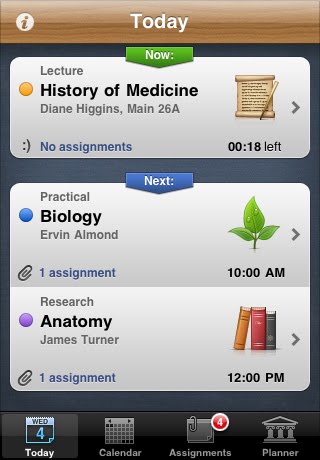
Plan your acticities by using iStudiez application for iphone

iStudiez application for iphone

If you're a medical student, you may want to think about using iStudiez Pro as you study for your exams. This is a great tool that can help you leverage mobile technology as you're going through medical school. iStudiez can help you organize your schedule, keep up with homework and assignments, and stay on top of your grades. If you're on a tight budget, then you can get iStudiez Lite for free.

Once you start using the app you will immediately want nothing else to be the tool to arrange all your schedule and homework once and for good. Read below and find out why iStudiez Pro would be the most efficient app on your device!

ORGANIZING YOUR SCHEDULE
:
Unique built-in planner lets you input and easy manage all types of schedules including classic, alternating (A & B weeks), rotating and block schedule. Not only you can enter most common course details, but also add instructors with all related information such as office hours, affiliation, phone number and email address. As well you are welcome to add holiday periods and even cancel separate classes in case of outstanding events. In addition, you are supplied with an expanded set of icons designed especially for iStudiez Pro to mark your class types and extracurricular activities. Color labels are available for your convenience to mark each particular course.

FOLLOWING UP WITH YOUR HOMEWORK:
Special section is dedicated to keep track of your homework and assignments. Whatever is the way you are used to manage your tasks, you will find it all in iStudiez Pro. Either you want to organize your assignments by date, by course or by priority, or sort them into pending and completed, you have all options at your hand. Sometimes you might have group work, so it is envisaged that you can add a partner to any of your assignments (either choose from contacts or create a new contact right inside the app).

SUMMARIZING IT UP FOR YOU:
Once your schedule is added, the summary of current classes and tasks is automatically reflected in Today view. You'll see list of events and assignments including all details such as event type, location, time left, class instructor, number of tasks pending and what's next on schedule. Courses reflected in Today view are easily modifiable in each and every detail. Today icon always sticks you to the current date!

TRACKING YOUR GRADE/GPA
:
This option is based on assignments (support of weighted/non-weighted assignments), and GPA calculator is available both for current and past semesters. Support of most world used grading scales (letter grades, percents, points).

KEEPING YOU ALERT:
You will always be up to date with pending tasks and upcoming classes and events with iStudiez Pro. The app boasts Push Notifications feature which allows you set general alarm time for your classes and separate alarms for each of your assignments and homework. Setting the alarms is quick and smartly integrated within the interface of the app, so prepare to be the most resulting fellow ever with no special memorizing efforts!

GUARDING YOUR DATA
:
No way you will ever lose your data if something's wrong with your device. iStudiez Pro takes care of you and offers the option to back up your data by sending it to your e-mail address with tapping just one button!

Download from itunes now

Sunday, January 23, 2011

Listen to Heart sounds with your i-phone by using iStethoscope Expert application


There's been tremendous hype about the new blood pressure cuff for iPhone. What if you could also use your iPhone to listen for abdominal gurgles, wheezes, or even the heartbeat of your unborn child?

The iStethoscope Expert app makes this possible, and best of all, it's free! You can use your device's microphone to listen for heart, lung, and bowel sounds. The app has a built-in noise canceler that will help amplify the sound of interest. If your device does not have a microphone, or if you'd simply like to enhance the sound, you may purchase the CardioTech electronic stethoscope peripheral by Zetris for $24.99.

Notable features of this app include:
- Guides to heart, lung, and bowel sounds, including phonocardiograms, audio demonstrations and text explanations.
- Sound interpreters that help determine the underlying pathology of an abnormal sound.
- Stethoscope sound library including over 60 sounds.
- Hear fetal heart sounds at 20 weeks.
- Record, send, and save sounds for review.


Since the USMLE Step 1 exam now includes audio in some of the questions, this will be very useful for medical students studying auscultation, as well as for physicians, other healthcare personnel, and even for patient education or use at home. I'm excited to see the evolvement of these medical equipment attachments!

iStethoscope Expert is compatible with iPhone, iPad, and iPod touch.

Download this Application free from Itunes Store Here

Wednesday, January 19, 2011

Blausen Human Atlas for Android


The Blausen Human Atlas Android digital resource tool is derived from the Blausen proprietary medical animation library, containing over 8,000 individual animations and 13,000 illustrations. The atlas is internationally recognized as unequaled in the field of medical illustration.

The Human Atlas covers 15 general medical topics including Cancer, Circulatory, Digestive, Ear, Endocrine, Eye, Immune, Muscular, Nervous, Pediatric, Reproductive, Respiratory, Skeletal, Skin and Urinary, each with an average of ten animations.

Developed on a 6-7th grade reading level, the Human Atlas provides readily accessible and understandable educational content. It is an excellent point-of-care digital tool for patients, healthcare professionals, students, and consumers.

Saturday, January 15, 2011

Control your diabetes by using simple smartphone application by Vree


The Mobile Application for Diabetes from Vree gives your patients a full suite of useful tools in one easy-to-access location. These tools can help your patients better manage their diabetes and gain the confidence to make healthy, lasting changes in their lives.

FEATURES of Vree for Diabetes include:

• Diabetes Education – Understand type 2 diabetes and the steps you can take to manage it through a series of comprehensive, interactive lessons. Topics include blood glucose monitoring, healthy eating, weight loss, and exercise.

• Blood Glucose Tracking – Receive reminders for checking your blood glucose levels as well as reports on your progress.

• Nutrition Tracking – Make informed meal choices and count calories and carbohydrates with confidence. Vree for Diabetes calculates the nutritional information for any food item that you select. The optional meal reminder prompts you to eat your meals at regular times and records when and which foods you eat. You can work with your health care professionals to set daily caloric intake goals and monitor your progress at each meal to stay on track.

• Activity Tracking – Record your physical activity and consider some simple ways that you can become more active. Set reminders and track your progress!

• Medication Tracking – Identify the medications you are taking, set reminders, and record when you take your medications.

Progress Charts – Easily track and evaluate your progress. Review the reports with your health care professionals to determine how to best manage your type 2 diabetes over time.

• Blood Pressure Tracking – Receive reminders to check your blood pressure and keep track of your progress.

Mobile MerckMedicus for the iPhone


Mobile MerckMedicus, which gives you 24/7 access to clinical resources, helpful tools, and medical content wherever you go, is now available for download at the Apple iTunes Store.

MerckMedicus is an advertising-free medical portal designed specifically for U.S. healthcare providers. MerckMedicus provides breaking medical news, a wide variety of scientific learning resources, and cutting-edge diagnostic tools, all with no access fees. Merck launched MerckMedicus in 2001 as part of its century-long commitment to providing unbiased health information as a public service to consumers and health care professionals, which began with the publication of the first Merck Manual in 1899.

Registered users can simply download the application to their iPhone® or iPod touch® and log in with their username and password for MerckMedicus™.

PLEASE NOTE: This application is for U.S. healthcare professionals who are registered users of MerckMedicus. Please visit www.merckmedicus.com to create a username and password, which are required to download content to this application.

Friday, January 14, 2011

Top 10 free Medical Applications for iphone And Ipod touch

This week, I reviewed the list of "popular" free medical apps for the iPhone/iPod touch and here's the current list:
  1. Medscape by WebMD
  2. Color Blind Test by Tomato Co, Ltd
  3. Epocrates by Epocrates
  4. Stool Scanner Lite by Shaved Ham
  5. Medical Encyclopedia by University of Maryland Medical System
  6. Stress Check by AIIR Consulting LLC
  7. Relax Ocean Waves by FreeApps
  8. Muscle System, LLC
  9. Health Tips 1000 by Michael Quach
  10. Skeletal System, LLC
Remember that when you're on the Apple App Store, "Medical" is its own category. It doesn't fall inside of "References" and it doesn't fall under "Healthcare & Fitness." Some of the apps listed above should probably go under "Healthcare & Fitness," but they got listed under "Medical" instead.


The list above clearly indicates that these "popular" apps are not popular exclusively among health care professionals. The popularity rating is heavily influenced by consumers who are downloading free medical apps to play around with them and to learn more about medicine. That's part of the reason why you won't see some great free medical apps on that "top 10" list.

Friday, January 07, 2011

Record Electrocardiogram (ECG) By using I-Phone

This is an awesome application. This video Demonstrate how you can record ECG by simply using your iphone, instantaneously.

Netter's Atlas of Human Anatomy for iPhone, Android and BlackBerry


This is a great app for first-year medical students. Why didn't I have this when I was in medical school?

Netter's Atlas of Human Anatomy is the most revered and best-selling anatomy atlas in the English language.

Available on: iPhone/iPod touch/iPad, Android, Blackberry, Palm and more...

Author(s): Frank H. Netter, MD

Key Features

* Over 532 detailed drawings that allow you to learn structures with confidence.

* With Skyscape Hotspots, you can tap on spots pointing to various parts of an image and get help identifying the structures shown.

* New radiographs, computed tomographic (CT) images, CT angiograms, and magnetic resonance (MR) images

You can DOWNLOAD this Application from itunes Store here

Blood pressure checking Application For I-Phone with Cuff


During last few days, more i-Phone medical attachments have surfaced. On the same day, two companies have released a blood pressure cuff that attaches to the bottom pin connectors of the i-Phone and comes with a custom app that reads and monitors the results.


1. Withings is a Paris-based company that develops health-related connected devices. You might have heard of their first product, the first WiFi Body scale that transmits results to your i-phone and creates graphs of your progress. Now, they've created a Blood Pressure Monitor. It is a pretty slick looking blood pressure cuff. You attach it to your i-phone and using their app, you can record your BP measurements. The app will upload results to your Google Health book or to an online, secured, personal site. It also supports social media functions such as tweeting your BP to twitter. The device will cost $130 dollars and expects to ship this month.

2. I-Health is a startup company based in Mountain View, California. They've also released a blood pressure monitoring device. What's different from Withings is that their blood pressure cuff attaches to an i-Phone Dock. Their i-Phone App also has graphing capabilities and sharing via email. iHealth is less expensive then Witherings, costing $99.95.

Both products will be showcasing at the Consumer Electronics show.
This is posing to be a great trend in medical smartphone technology. First, there was the iPhone glucometer, then an iPhone EKG, now an iPhone BP cuff. What's next?

My best guess would be an i-Phone pulse oximeter. That's the only thing missing in your initial Vital Signs assessment. Maybe we will start seeing an i-Phone version of the i-Stat where you can put a drop of blood and receive instantaneous chemistry panels, blood count panels, INR's, etc. The future for medical smartphone technology is looking very bright.